Markdown: the basics
Markdown is a simple way to format text with ordinary characters: a # for a heading, asterisks for bold, a hyphen for a list. You type the text without an editor, and the website turns it into neat formatting. Handy for texts that you also use in an email, an AI assistant or another program.
Writing a text in Markdown
- Open the text or page in the admin.
- Below the text box, choose Markdown as the kind of text (by default Default).
- Type the text with the formatting below.
- Click Save and check the result on the website.
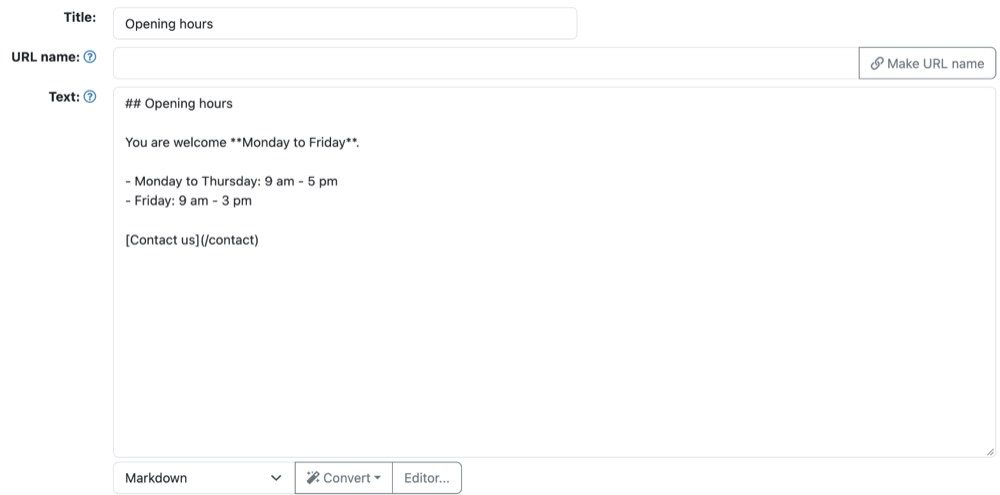
You edit a Markdown text in the text box itself, not in the Editor.... Do you need a bit of formatting that Markdown doesn't have? Then you may put plain HTML in between.
The formatting
Headings: a # in front of the heading; the more hash signs, the smaller the heading.
## Heading
### Smaller heading
Bold and italic:
**bold**, *italic* and ***bold and italic***Lists: a hyphen for a bulleted list, a number with a full stop for a numbered list. Leave an empty line between the list and the text above it.
- apples
- pears

1. First step
2. Second step
Links and images:
[Contact us](/contact)
A table:
| Day     | Open        |
|---------|-------------|
| Monday  | 9:00-17:00  |
| Tuesday | 9:00-17:00  |
You start a new paragraph with an empty line. A quote starts with >, a horizontal line is ---.
Convert
Below the text box is the Convert button with:
- Markdown to HTML: turns a Markdown text into an HTML text, for example if you want to continue in the editor.
- HTML to Markdown: turns an HTML text into a Markdown text. Check the result: formatting that Markdown doesn't have, such as colors, may disappear.
- Markdown to WhatsApp and WhatsApp to Markdown: convert bold and italic to WhatsApp's characters and back, handy when you copy a message.
See also
- HTML and CSS: the basics
- Writing good web texts and link texts
- Formatting text in the editor
Checked: November 2026