Search & sharing overview
The Search & sharing overview lists all public pages of your website, with their title and description for search engines. This way you quickly find pages with a title that is too long, duplicate titles, or pages that are hidden from search engines.
- Click the Tools & Settings icon at the top (the sliders) and choose Statistics.
- In the menu on the left, click Search & sharing. At the top you see how many public pages your website has and how many of them have manual settings.
- Under Show, choose which pages you want to see:
- All pages;
- Set by hand: pages where you filled in something yourself;
- With a problem: see the Problems column;
- noindex: pages that search engines don't show.
- Looking for one page? Type part of the address or the name under URL or name and click Filter.
- Click the name of a page to open the Search & sharing block of that page and change the title or description there.
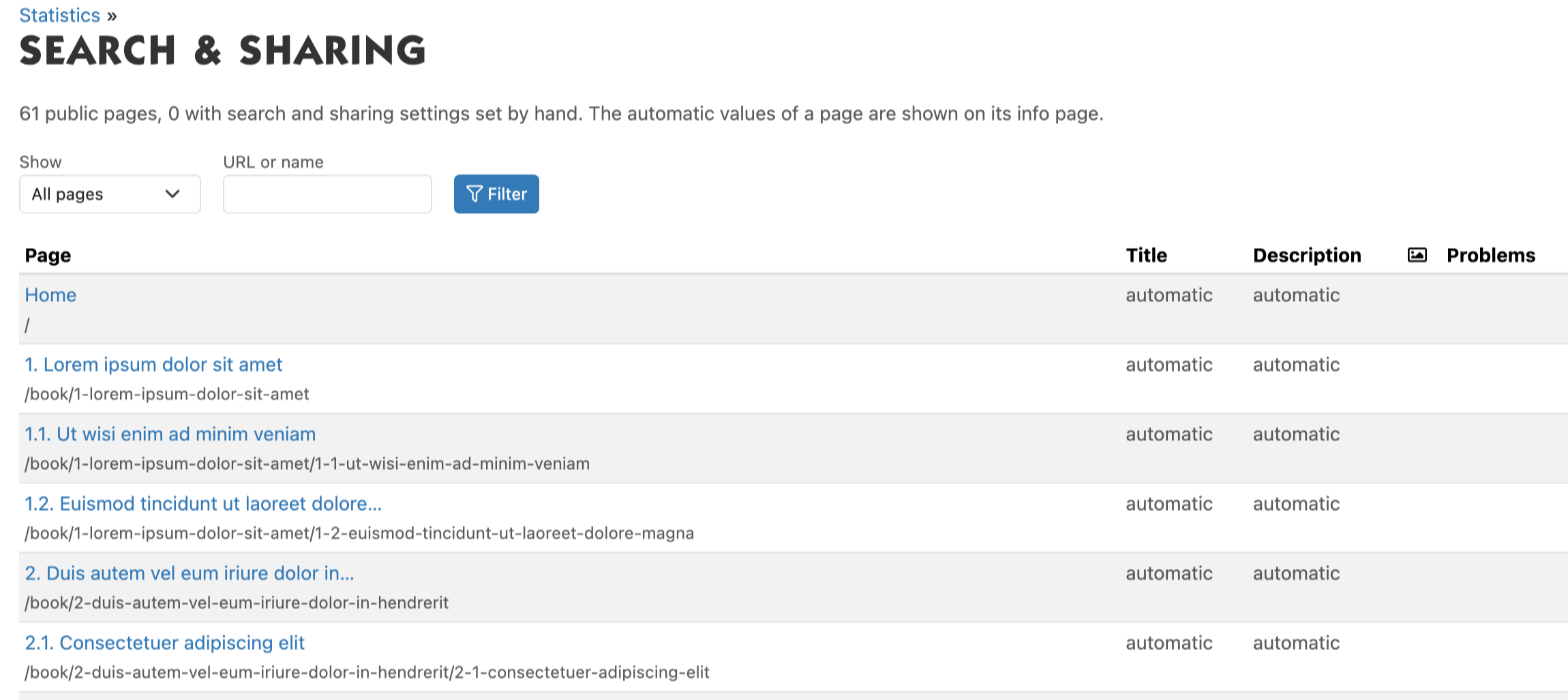
The Title and Description columns show the number of characters in brackets. If it says automatic, the page uses the automatic value. In the Problems column you may see: title too long, description too long, same title as another page, noindex or canonical elsewhere.
You can also open the overview with the All pages link next to the heading of the Search & sharing block on an info page. Only pages with a URL name that everyone may see are in the list.
Pages without object
Some pages, such as the pages of a module (for example /appointment), are not an item in the admin. They are listed at the bottom under Pages without object. To set a title or description for such a page, enter its address under Add a page without object (URL path) and click Add. This takes you to the Search & sharing block for that address.
See also
- Title and description for search engines
- Hiding a page from search engines
- The sitemap and URL names for search engines
Checked: November 2026