The sitemap and URL names for search engines
A sitemap is a list of all the pages of your website, made especially for search engines. Xanti makes this list automatically; you don't have to do anything. You find it at the address /sitemap.xml of your website, for example www.example.com/sitemap.xml.
Viewing and submitting the sitemap
- In your browser, open the address of your website with
/sitemap.xmlafter it. - Check that the important pages are in it.
- Submit the address of the sitemap to Google Search Console (and Bing Webmaster Tools, if you like). This tells the search engine which pages there are.
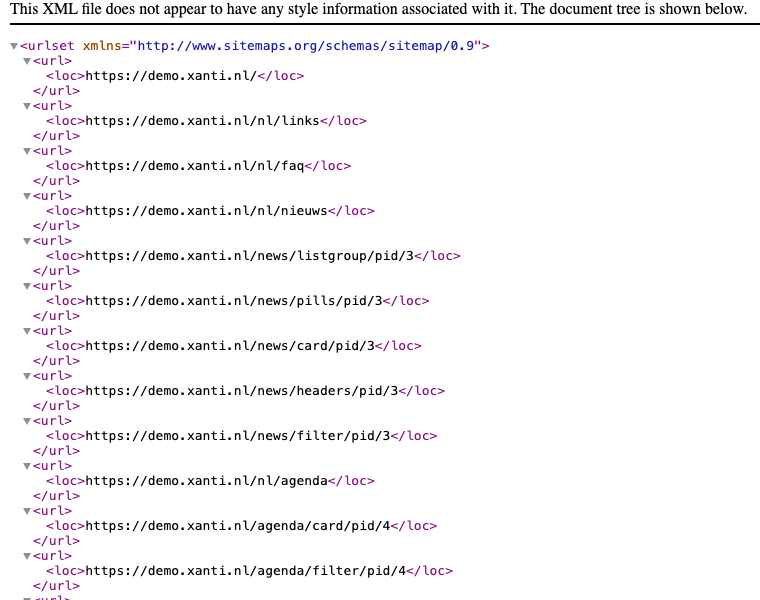
What is in the sitemap?
- the pages that the menu of your website links to;
- the items with their own page in the folders that the menu opens, such as news items;
- all pages that everyone may see, even if they are not in the menu.
Pages that only logged-in visitors or webmasters can see are not in it. Xanti also leaves out pages that you set to noindex under Search engines. Even when you are logged in yourself, you see the same sitemap as a visitor.
The sitemap is updated automatically as soon as you add, change or delete something. Is a new page still missing? Log in and open the address with ?refresh=1 after it, for example /sitemap.xml?refresh=1. Xanti then builds the sitemap again.
URL names for search engines
The address of a page counts for search engines. A good URL name is short, contains only lowercase letters, numbers and hyphens, and matches the title, for example /about-us. How to change a URL name and how Xanti redirects the old address is explained on the page "URL names and redirects".
If a page has a URL name, Xanti passes that address to search engines as the page's own address. That way a page that can be reached at different addresses counts only once.
See also
- URL names and redirects
- Hiding a page from search engines
- Search & sharing overview
Checked: November 2026