The appointment pages on your website
Visitors make an appointment on a few fixed pages of your website. Xanti creates those pages itself. You provide a link to them, from the menu or from a page.
How a visitor books
- Choose a service: the visitor chooses a service. If you have only one service, Xanti skips this step.
- Choose a date and time: the visitor browses week by week, clicks a day and chooses a time. If you have several resources, the visitor chooses No preference or a particular resource.
- Your details: the visitor fills in their Name, Phone, E-mail address and, if asked, Birthday and Remarks, and clicks Make appointment. Name and e-mail address are required.
- The visitor sees the confirmation page and gets the confirmation e-mail.
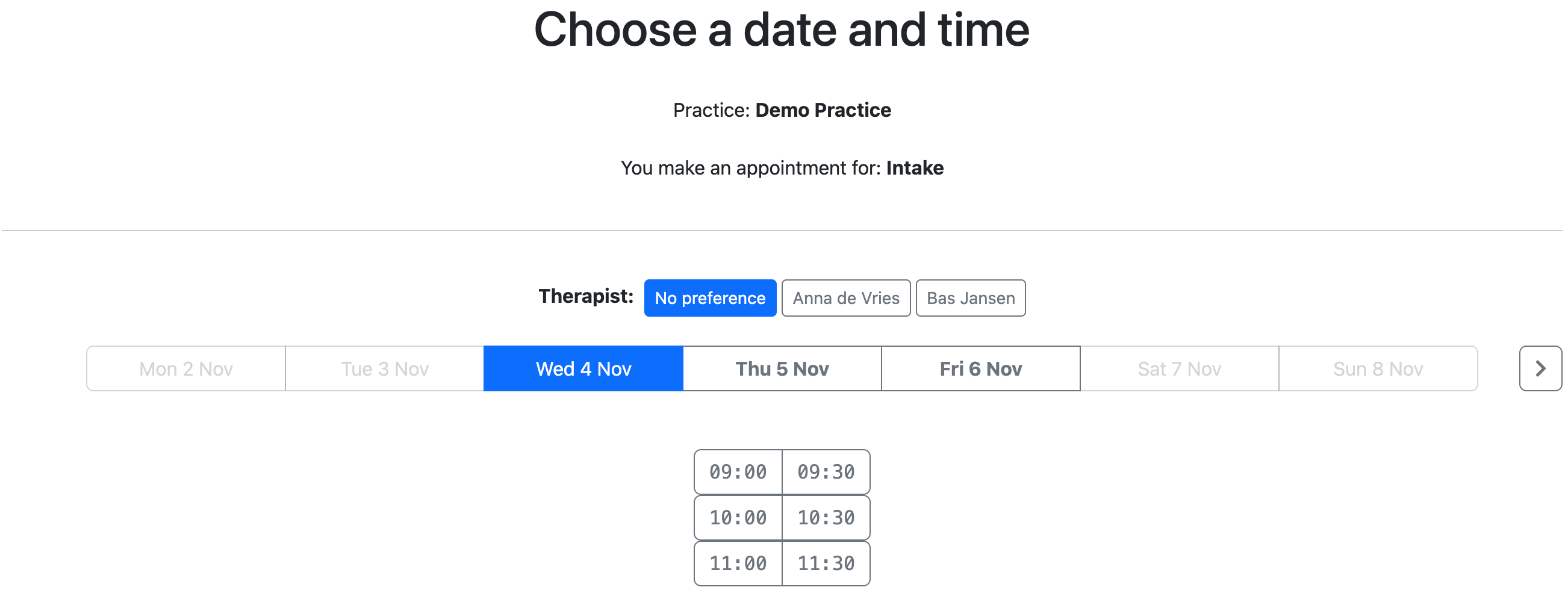
Only services with a calendar with opening hours appear in the first step. The headings above the steps are default texts that you can change (see E-mails to customers).
Creating a link to the appointment planner
The start address is /appointment/service. You can use it in two ways:
- In the menu or as a link: create a menu item or a link to /appointment/service, with a text such as Make an appointment.
- In a page: in the text of a page, type [/appointment/service], with the square brackets. The first step of the planner then appears in that spot, between your own text.
Always use the start address /appointment/service, not the address of a later step. A later step needs data from the previous step. Do you want to test whether a calendar works? Open the calendar in the management pages and click Make appointment.
Moving or cancelling by the customer
The e-mails contain the link Move or cancel this appointment. With it, the customer opens their own page with their appointment and the buttons Choose another date and time and Cancel appointment. This is possible up to 24 hours before the appointment; you set that number of hours with appt_cancel_hours. After that, the customer sees that they must contact you.
See also
- Setting up the appointment planner
- Calendars and opening hours
- E-mails to customers
Checked: November 2026