Services and resources
A service is what a customer makes an appointment for, such as an intake interview or a check-up. Resources are the people or rooms with which the appointment takes place. On your website, this section may have a different name, such as Therapists (see Setting up the appointment planner).
Adding a service
You create new services in the admin:
- In the admin, open the folder Services.
- Click Add Service.
- Fill in the Name, as the customer sees it.
- Fill in the Slug: a short name for the web address, with only lowercase letters, digits and hyphens, for example intake.
- Under Length, choose how many minutes an appointment takes.
- Click Save.
Changing a service
- On your website, go to /beheer/service, or click Services on the management page.
- Click the service and then Change.
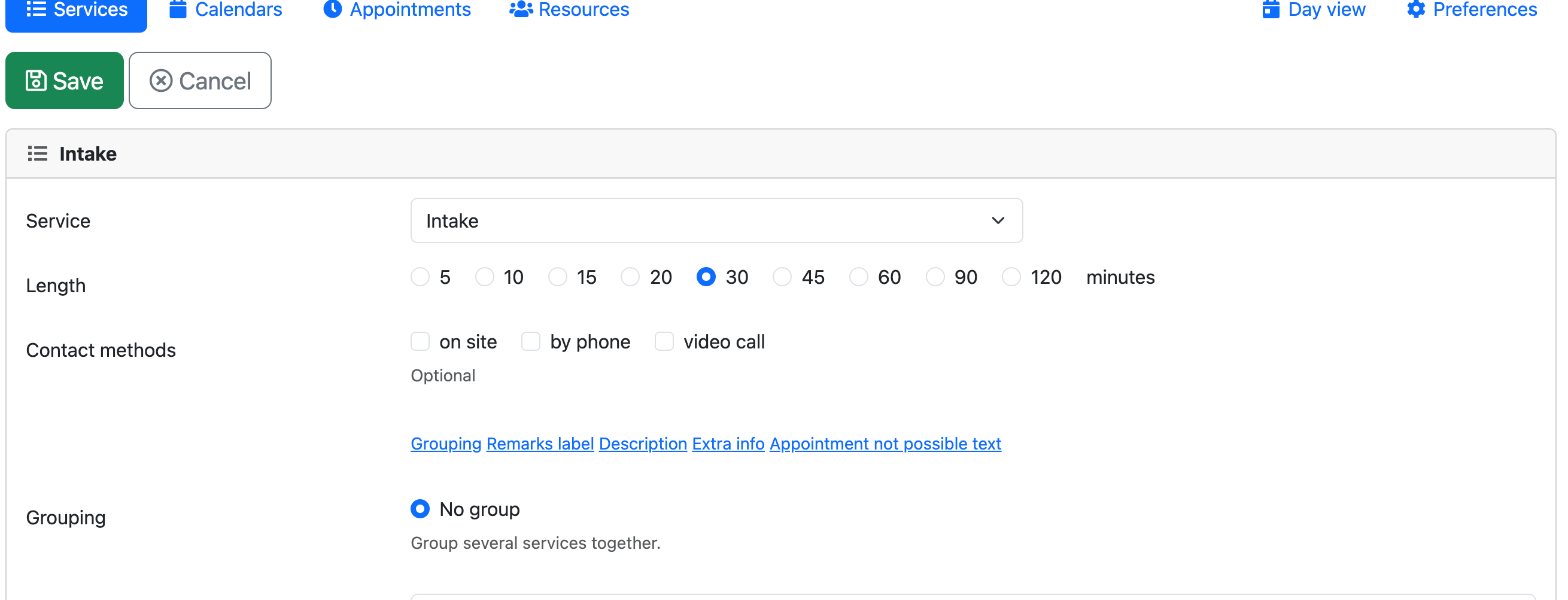
- Change the Length, and under Contact methods, tick the ways in which the appointment can take place. If you choose one or more, the customer must choose one when booking.
- Below the fields are links for extra texts. Click one to show the field:
- Description: visible when the customer chooses the service.
- Extra info: on the confirmation page and in the confirmation e-mail.
- Appointment not possible text: when no time is free anymore.
- Remarks label: a different text above the Remarks box on the form.
- Grouping: services in the same group share one calendar.
- Under Attachments, you can add files.
- Click Save.
A service only appears on your website once it has a calendar with opening hours. You cannot delete a service that has a linked calendar.
Adding resources
- On the management page, click Resources and then Add.
- Fill in the Name. You may leave the Slug empty: Xanti makes it from the name.
- Fill in a Description if you like.
- Click Save.
Then link the resource to a calendar (see Calendars and opening hours). You cannot delete a resource that has linked calendars.
See also
- Setting up the appointment planner
- Calendars and opening hours
- E-mails to customers
Checked: November 2026