E-mails to users
Do you want to send a user an e-mail you send more often, for example how to create a new password? Use a standard e-mail. Xanti fills in the name and other details of the user for you.
Sending a standard e-mail
- Open the user in the Users folder.
- Click the button with the envelope (E-mail).
- Under Template:, choose which e-mail you want to send. The e-mail is filled in right away with the details of this user.
- Check the address under To:. Do you want to send a copy to someone else? Fill in Cc: or Bcc:. Separate several addresses with a comma.
- Change the subject under Subject: and the text if needed. This only changes this one e-mail.
- Do you want to send files along? Under Attachments, tick a file of the user, or drag a file into the box or drag & drop files here.
- Click Send.
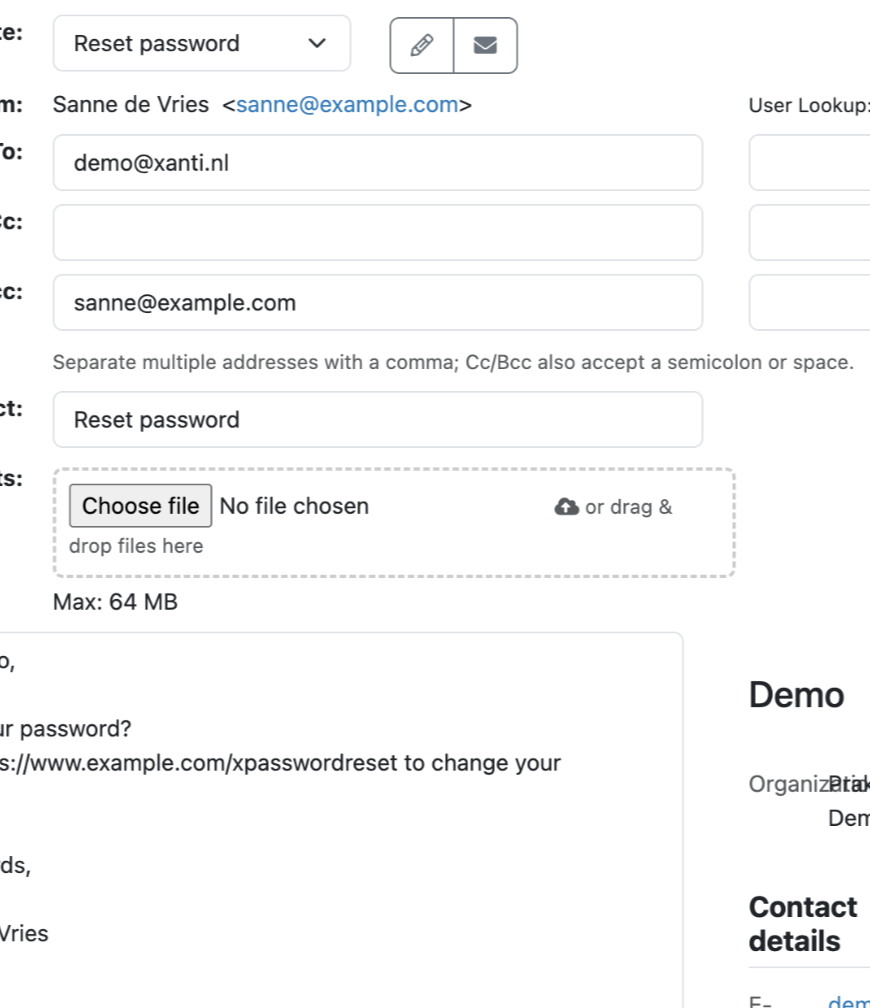
Does the same e-mail need to go to more users in the list? Click the button next to Send (Send & Next). You go straight to the next user, with the same e-mail already filled in.
Changing the standard e-mails
- At the top right, click the button with the sliders (Tools & Settings) and choose Preferences.
- On the left, click User E-mails. You see all standard e-mails one below the other.
- Change what you want in an e-mail:
- the box at the top: the name of the e-mail in the Template: list;
- Template: the template with the layout;
- From:, Cc:, Bcc: and Subject:;
- the text. With the drop-down list below the text you insert a field, such as Name, First Name or Letter Salutation.
- Click Save changes.
With Add User E-mail you create a new standard e-mail. With Delete you remove one, and with Sort you put them in a different order.
A field is a code between curly brackets. If you write Dear {$briefaanhef}, the user sees for example Dear Mrs Smith, in the e-mail. Don't send passwords by e-mail: Xanti stores passwords encrypted and cannot send them. Instead, send an e-mail with the link the user can use to create a new password, such as the standard e-mail Reset password.
See also
- Adding or editing a user
- Changing your password or e-mail address
- Creating a mailing
Checked: November 2026